Street Corner Mahjong — Offline Hong Kong Mahjong for Android
Get Street Corner Mahjong for offline Android play with computer opponents and Cantonese voices. Compare app and browser rules, local saves and download options.

Keep a Hong Kong mahjong table in your pocket.
A single-player Hong Kong 13-tile mahjong game for Android. Play complete matches against computer opponents without creating an account.
Play against computer opponents without a network connection after installation.
Open the app and start a single-player Hong Kong mahjong match.
Table calls and character voices use Cantonese audio.
The current Android app interface is in Traditional Chinese.

Scan to open this app page on your phone and choose how to play.
Browser saves and app saves are separate and do not transfer between them. Check Google Play for current device compatibility and regional availability.
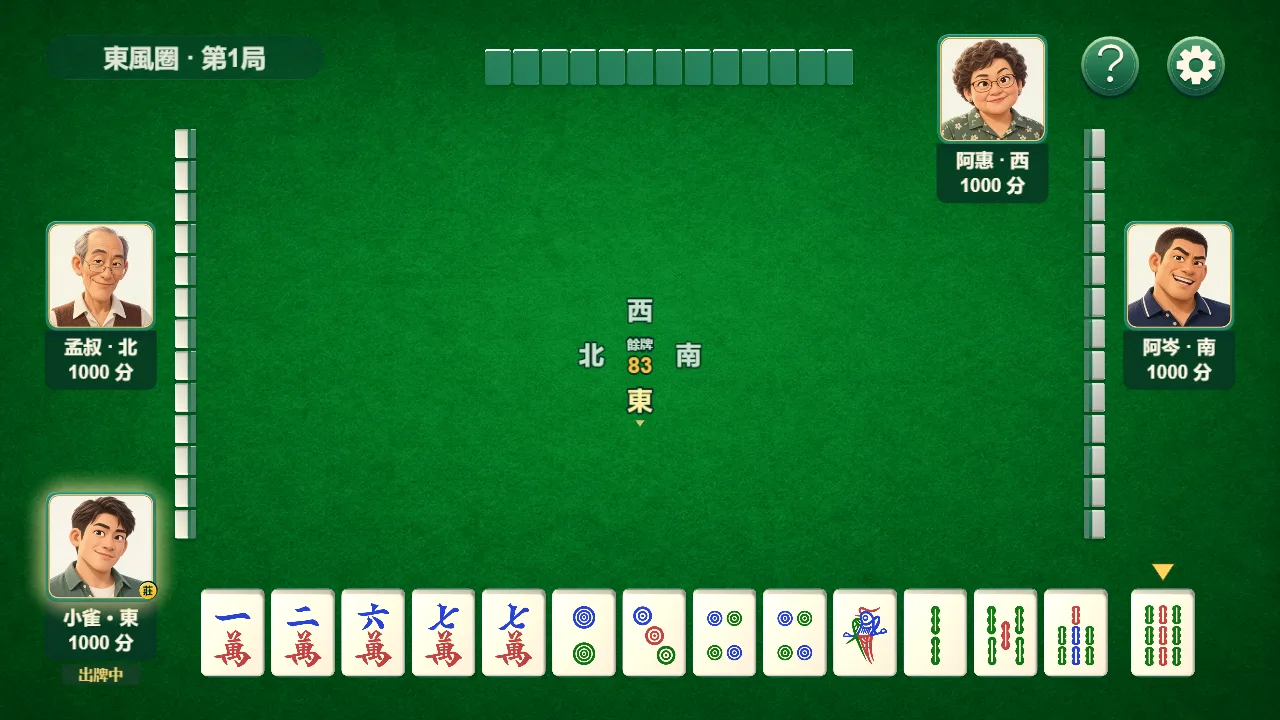
Choose between the Android app and browser practice
Use Android for installed offline play. Use the browser for the interactive lessons, calculators and a quick practice hand. The Google Play description checked on 15 October 2026 lists no-flower play; check the Rules screen in your installed version before applying a website example.
| Feature | Android app | Browser |
|---|---|---|
| Connection | Offline games after installation | Connect to load pages and the table |
| Flowers | 136 tiles, no flowers in the listing | 144 tiles with flowers |
| Minimum / cap | 3 / 8 faan in the listing | 0 in practice, otherwise 3; cap 8 |
| Progress | Local app save | Local to this browser; separate from the app |
Source: current Google Play description ↗
Before your first offline game
- Open Google Play while connected and check that your device can install the app.
- Open the installed app, read its rules and play part of a hand.
- Turn connections off and test both a new hand and resuming locally before relying on it during a trip.
Street Corner Mahjong for Android
Street Corner Mahjong: Hong Kong Mahjong 13-Tile Offline Edition is the KX Works native Android game. It offers offline single-player Hong Kong Mahjong against computer opponents, requires no KX Works account, and supports practising recognised hand patterns at your own pace.
The current app interface is in Traditional Chinese. Its Hong Kong Mahjong terminology and play flow are designed for the native game; website language selection does not change the installed app’s interface.
Get it on Google Play
Google Play lists the available version, device compatibility and app updates. Opening the download link takes you to Google Play, whose own terms and privacy policy apply.
An iOS download is not currently available here. On an iPhone or iPad, you can use the browser version instead. The website and Android app keep separate local saves and do not offer cross-device progress sync.
Website and app privacy are separate
The website uses Google Analytics 4 for public-page traffic statistics, as explained in its Privacy page, and does not load advertising SDKs. The native Android app may use advertising and analytics services, which require a network connection and are described in the app privacy information linked from Google Play.
Offline play and local saves do not mean that every app feature is offline or that the app processes no service data. Review the current Google Play disclosure and app privacy policy before installing.
A few things to know
Do website flower examples apply in the app?
The checked Android description uses no flowers; the browser table uses flowers. Compare the installed app’s rules before carrying a scoring example across.
Does my browser game transfer to the app?
No. Each browser and the app keep their own local saves.
Can I play on an iPhone?
Use the browser version. An iOS app is not available here.
Which language does the app use?
Traditional Chinese with Cantonese voices. The website supports English, Traditional Chinese and Simplified Chinese.